Freebie Project Life - Month in Review Cards


This were designed just for you. Thanks for the idea Amy.

This is a full set of month cards that match the Week in Review freebie cards. (There are an extra August and November for no other reason than I couldn't decide which color looked the best.) These Month & Week in Review cards are designed to leave plenty of space to journal or add a photo.


Hope you guys like them! I would love a link to see how you used them :)

Please let me know what you think and share with your friends. Just point them back using a link.
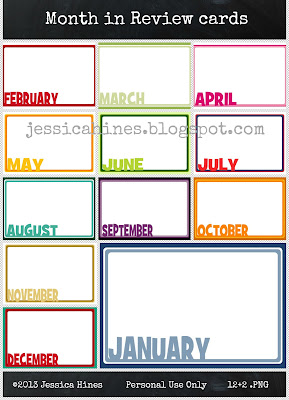
Jessica Hines Designs: Freebie Month in Review journal cards #ProjectLife
 
To download, click here or on the image above.

Project Life is a back-to-basics approach to memory-keeping created by Becky Higgins. It can be anything you want it to be. To learn more about Project Life check out Becky’s Website. The pieces used in my album are available through Jessica Sprague here and Lettering Delights here. My Project Life is all digital, I'm using MyMemories Suite. Simple.

Thanks for visiting!
All the Best,


Jessica


The copyright in this blog, and the material on this blog (including without limitation the text, computer code, artwork, photographs, images, music, audio material, video material and audio-visual material on this blog) is owned by Jessica Hines. If you would like to share, only link back to this blog. Downloads are for personal use only.

Freebie - Ombre Color Cards

Welcome

Here are some simple Ombre cards in various colors for your Project Life. There are 7 .png vertical cards in a compressed zipped folder. These could be for journaling or just to add some color; however, you decide to use these I would really love to see it.

I'm working on more ombre cards, come back soon.

Please let me know what you think and share with your friends. Just point them back using a link.

Jessica Hines Designs: Freebie digital Ombre colorful cards #ProjectLife

To download, click here or on the image.

Project Life is a back-to-basics approach to memory-keeping created by Becky Higgins. It can be anything you want it to be. To learn more about Project Life check out Becky’s Website. The pieces used in my album are available through Jessica Sprague here and Lettering Delights here. My Project Life is all digital, I'm using MyMemories Suite. Simple.

Thanks for visiting!
All the Best,


Jessica


The copyright in this blog, and the material on this blog (including without limitation the text, computer code, artwork, photographs, images, music, audio material, video material and audio-visual material on this blog) is owned by Jessica Hines. If you would like to share, only link back to this blog.

Project Life: 2012 Week 3

Week 3: January 16-24


Elements used:
Page 1 Middle-left:
Page 2 Middle-left:
Fonts: Watermarks: aka Dora; Journaling: Segoe Script
Paper: Echo Paper Comfort & Cheer (Jessica Sprague here)


Project Life is a back-to-basics approach to memory-keeping created by Becky Higgins. It can be anything you want it to be. To learn more about Project Life check out Becky’s Website. The pieces used in my album are available through Jessica Sprague here and Lettering Delights here. My Project Life is all digital, I'm using MyMemories Suite. Simple.

Thanks for visiting!

All the best,
Jessica


The copyright in this blog, and the material on this blog (including without limitation the text, computer code, artwork, photographs, images, music, audio material, video material and audio-visual material on this blog) is owned by Jessica Hines. If you would like to share, only link back to this blog.

Project Life: 2012 Week 2


Week 2: January 9-15


This week we went to the park quiet a bit since we don't much nice weather - it's hot and humid here most of the year. We also forgot to take some of our Christmas pictures so it was make-up time, starting with a decent family picture. Normally we take one in front of the Christmas tree but we had to settle for the fireplace mantel - what can you do?! You know it bothers me that our year after year pictures has been one way and since I forgot I had to change it but you know what at least I got a picture. I could have been totally crazy and set up the tree again but I had to set crazy aside.

...it will be ok... [exhale] :)


Elements used:
Page 1 Top-left: Echo Park Hello Summer (Jessica Sprague here)
Page 2 Bottom-left wordart: Echo Park Hello Summer
Fonts: Watermarks: aka Dora; Journaling: Segoe Script
Paper: Echo Park Hello Summer


Project Life is a back-to-basics approach to memory-keeping created by Becky Higgins. It can be anything you want it to be. To learn more about Project Life check out Becky’s Website. The pieces used in my album are available through Jessica Sprague here and Lettering Delights here. My Project Life is all digital, I'm using MyMemories Suite. Simple.

Thanks for visiting!

All the best,
Jessica


The copyright in this blog, and the material on this blog (including without limitation the text, computer code, artwork, photographs, images, music, audio material, video material and audio-visual material on this blog) is owned by Jessica Hines. If you would like to share, only link back to this blog.

Project Life: 2012 Week 1

Week 1: January 1-8


Elements used:
Page 1 Top-left (bugs): Lettering Delights
Page 2 Bottom-left: A Vegas Girl at Heart freebie
Fonts: Watermarks: aka Dora; Journaling: Segoe Script;"real life": CK Puppy


Project Life is a back-to-basics approach to memory-keeping created by Becky Higgins. It can be anything you want it to be. To learn more about Project Life check out Becky’s Website. The pieces used in my album are available through Jessica Sprague here and Lettering Delights here. My Project Life is all digital, I'm using MyMemories Suite. Simple.

Thanks for visiting!

All the best,
Jessica


The copyright in this blog, and the material on this blog (including without limitation the text, computer code, artwork, photographs, images, music, audio material, video material and audio-visual material on this blog) is owned by Jessica Hines. If you would like to share, only link back to this blog.

Project Life: 2012 Title Page

Did anyone else realize it's 2013... what


As any parent, just doing the best I can and maintain a level of sanity, I'm thoroughly behind on photo displaying, journal writing, and memory organization (on multiple levels). I truly understand why homes with multiple children you see a lot more photos of the first child and progressively less of younger children - my home included. So this is why I'm sharing with you my 2012 Project Life pages (and not yet 2013).


Beginning at the beginning... the title page

Waiting until the year has concluded made the title page come together easier. I like having a list of key events from the year and these with our annual professional photos follows how my scrapbooks prior to ProjectLife started so makes my consistency/organizational-craziness happy. I don't know how other families manage multiple professional photo sessions, it is usually [unfortunately] an exhausting event for us.

 2012 Title Page


Elements used:
Bottom-left: RobynMeierotto freebie


Project Life is a back-to-basics approach to memory-keeping created by Becky Higgins. It can be anything you want it to be. To learn more about Project Life check out Becky’s Website. The pieces used in my album are available through Jessica Sprague here and Lettering Delights here. My Project Life is all digital, I'm using MyMemories Suite. Simple.

Thanks for visiting!

All the best,
Jessica


The copyright in this blog, and the material on this blog (including without limitation the text, computer code, artwork, photographs, images, music, audio material, video material and audio-visual material on this blog) is owned by Jessica Hines. If you would like to share, only link back to this blog.

How'd you make a Blog (or Facebook) Banner: PicMonkey

The current blog banner referenced in this post.

For those that have a blog or curious about banners, let me tell you - you can do this too! Oh, and did I mention, free. No downloads required.

I'm please to introduce you to PicMonkey. PicMonkey is a website that allows you to edit photos or create collages. Simple, user friendly and free. (I'm not an affiliate, just a big fan!)

To create the blog banner, I actually used both PicMonkey functions, edit photo & create a collage. First. click "Create a collage." Then upload the images you would like in your banner. Select the size "FB banner" and proceeded to drag and drop the uploaded images.

You can resize and add images beyond the template suggestion. Also I added scrapbooking files to fill in space to make certain images larger than others. I also recommend trying to keep the banner mostly symetrical.

Then, click Edit, to add text. In the banner above, the text on the left side "Love Laugh Live" and the text near the bottom right "Project Life" was added using PicMonkey.


Presto, your own blog (or Facebook) banner.

Thanks for visiting!

All the best,
Jessica